
by Premiere Social Media | May 16, 2014 | Social media Marketing
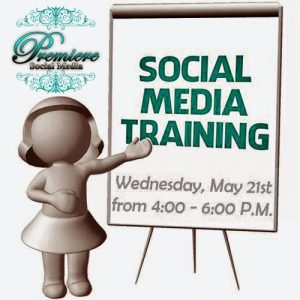 Learn, grow and prosper with us as we get a hands-on lesson from marketing specialist, Shyla Collier of Premiere Social Media on skills and strategies to promote your business.
This class is open to the public and we strongly encourage you to purchase your advance tickets ASAP to reserve your space, as seating is limited.
Bring your laptop or tablet for this class and be prepared to take notes and ask questions. The lesson duration is 90 minutes with an extra 30 minutes for Q&A. This class will strongly focus on Facebook, so make sure you have both a personal profile and a business page set up prior to enrolling.
Sourcehttp://www.facebook.com/premieresocialmediahttps://twitter.com/premsocialmedia

by Premiere Social Media | May 13, 2014 | Social media Marketing
Hot off the press! Extra extra, read all about it. Premiere Social Media now has a weekly publication. This is an online newspaper all based on Social Media. Great, articles, blogs and videos to help you in your marketing efforts. Even current news on Social Media.
Click here to see Premiere Social Media News!
Source
http://www.facebook.com/premieresocialmedia
https://twitter.com/premsocialmedia

by Premiere Social Media | Apr 23, 2014 | Social media Marketing
Premiere Social Media would like to show you how to change you Facebook URL! If you have a FB address on your business page with numbers, you need to change it. That is your FB ID and hackers can get into your account. It also makes it hard to search you and annoying for those looking for you and too long to put on business card and such. Here are the directions to change url:
1. Get on a desktop
2. Click on your page
3. Go to very top right and click Edit page
4. Click update page info
5. Click Facebook url or web address.
You can change it once EVER, be careful!
Source
http://www.facebook.com/premieresocialmedia
https://twitter.com/premsocialmedia

by Premiere Social Media | Apr 17, 2014 | Social media Marketing
1. Invite ALL friends from your personal page. Most of your friends will support you.
2. Link your FB page to your work section on your personal page instead of writing what the company is. That will help a lot!
3. Participate in like ladders. Remember to like everyone’s page!
4. Put the FB logo on you business card if the name is different post the link.
5. Run a giveaway.
6. Post Sales on your page and share them in groups.
7. On a marketing standpoint, make sure your business name portrays your product.
8. Post Compelling Content.
9. Become an expert and teach about your field.
Source
http://www.facebook.com/premieresocialmedia
https://twitter.com/premsocialmedia


Recent Comments